You can also explore and learn how to create your first team in i-Resonate Enterprise.

ContentCraft
Open Appi-Resonate Help Center
ContentCraft Help
BrandVoice
Content Campaigns
Scheduling
Team Management / WorkFlows
ProofLex Help
MindWrite Help
i-Resonate Corporate Setup: How Organizations Get Registered
The Corporate Setup is the foundational process through which i-Resonate creates and activates your organization’s dedicated Enterprise Workspace.
As part of this setup, i-Resonate builds your ProofLex Enterprise and ContentCraft Enterprise workspaces.
This setup ensures that your company operates within a secure, centrally managed corporate environment, giving you full control over:
-
User access
-
Team hierarchy
-
Roles and permissions
-
Workflow management
With a corporate account, your organization can collaborate efficiently and manage teams and workflows, all within i-resonate products..
To get your organization onboarded, follow these steps:
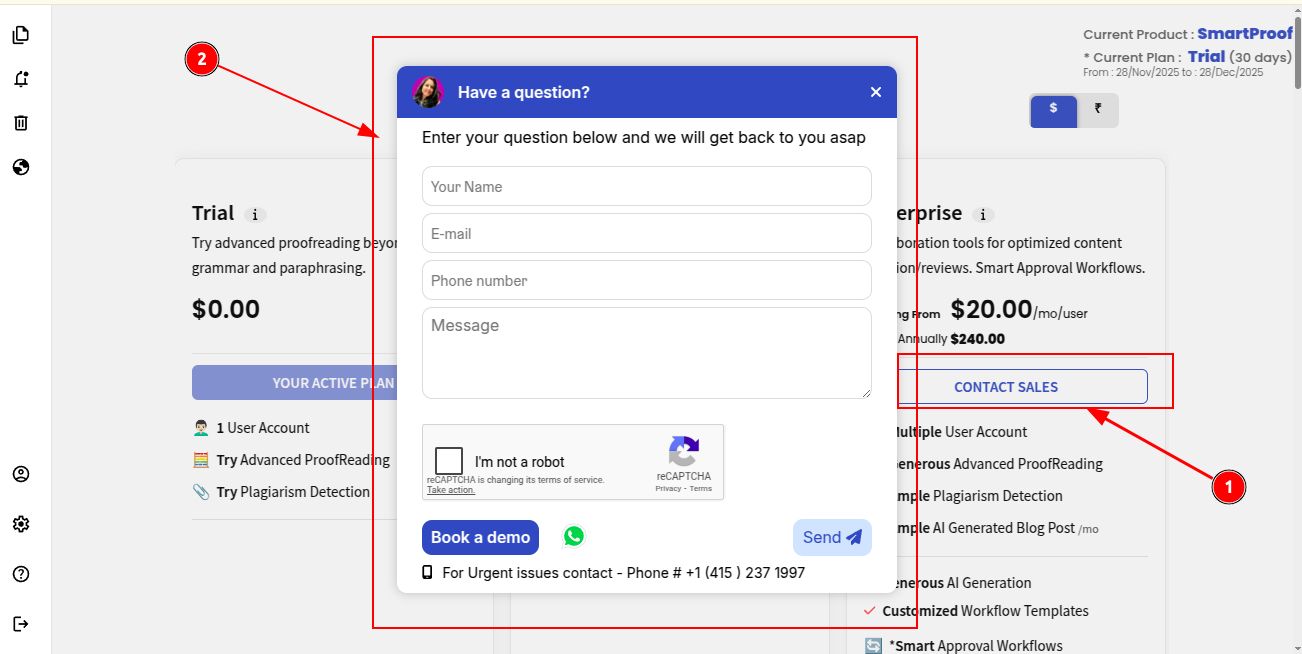
STEP 1. Choose the Enterprise Plan
To register your organization, start by selecting the ProofLex Enterprise plan.
This plan is designed for teams that need advanced workflows, collaboration and compliance tools.
STEP 2. Fill out the Registration Form
Complete the required form with your basic details.
You can also book a demo if you’d like a detailed walkthrough before getting started.
STEP 3. ProofLex Team Will Contact You
Once you submit the form, the i-resonate team will connect with you as soon as possible.
STEP 4. Organization Setup by i-Resonate
Once all your questions are addressed, our team configures your organization through the i-Resonate admin panel, ensuring everything is ready for use.
To complete the setup, we will need few details for successful corportate setup:
-
Organization Name
-
CIN
-
Tax Number
-
Registered Address
-
Super Admin Email ID
Who is a Super Admin in i-Resonate Enterprise Account?
A Super Admin is the primary account holder associated with the organization. This user receives the first and highest-level admin privileges, including the ability to:
-
Create additional Super Admins.
-
Create & manage teams and team members in Enterprise Account.
-
Manage the organization’s Purchase Order (PO) and user allocation.
NOTE: The first Super Admin is added to the corporate account by the i-Resonate team. After setup, you can create additional Super Admins for your organization to help manage teams, if needed.
STEP 5. Super Admin receives the Welcome Email
Once the PO is completed and onboarding is finalized, the Super Admin will receive a Welcome Email with access to the product’s Business Workspace.
The Corporate is now registered. You can now create teams and add users to the teams for smoothless workflow.
If you have any queries, feel free to reach us at connect@i-resonate.com