
ProofLex
Open Appi-Resonate Help Center
ProofLex Help
Document Creation
Proofreading
Doc Insights
Team Management / WorkFlows
Microsoft Word Plugin
Microsoft Outlook Plugin
ContentCraft Help
MindWrite Help
How to check intent of the document with ProofLex?
Content intent is simply the purpose behind your writing. It defines what you want to achieve i.e inform, persuade or engage your audience. Knowing your intent helps keep your message impactful.
ProofLex analyzes your document to identify its intent. This makes your message clear and more impactful, so that every piece of content truly resonates with your audience.
Step-by-Step Guide to Check Your Content’s Intent :
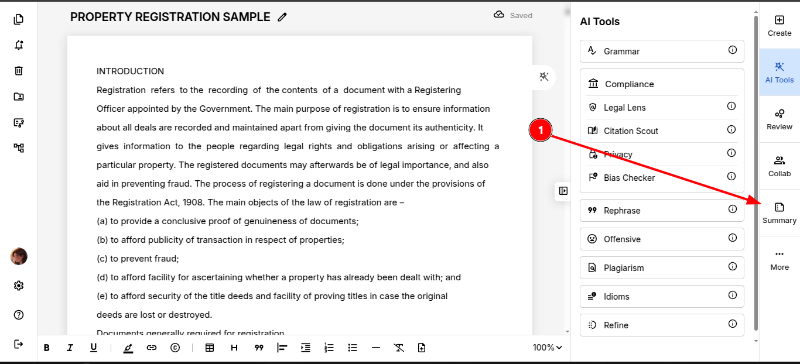
STEP 1: Once your document is imported into the editor, click on “Summary” from the right panel.
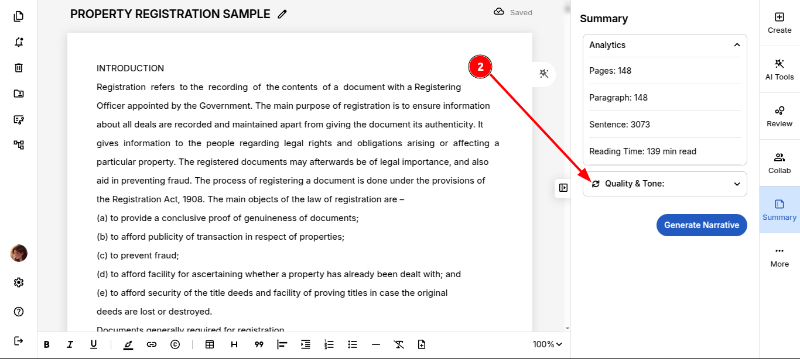
STEP 2: Refresh the “Quality & Tone” icon.
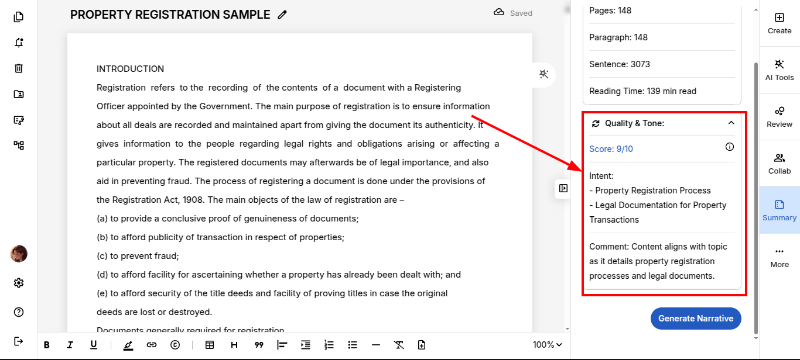
Your content’s intent will now be displayed, giving you a quick comment on the purpose behind your document at a glance.
You can also explore how to summarize your Document.