
ProofLex
Open Appi-Resonate Help Center
ProofLex Help
Document Creation
Proofreading
Doc Insights
Team Management / WorkFlows
Microsoft Word Plugin
Microsoft Outlook Plugin
ContentCraft Help
MindWrite Help
How to create a blank document in ProofLex?
Creating a blank document gives you a fresh space to organise your thoughts and build your content exactly the way you want.
A blank document is especially useful when you want complete control over tone and flow of the document.
With ProofLex, you can start from a clean page and then enhance your writing at every step i.e improving grammar, refining sentences, checking tone and ensuring clarity as you create.
Follow the steps below to create a new document :
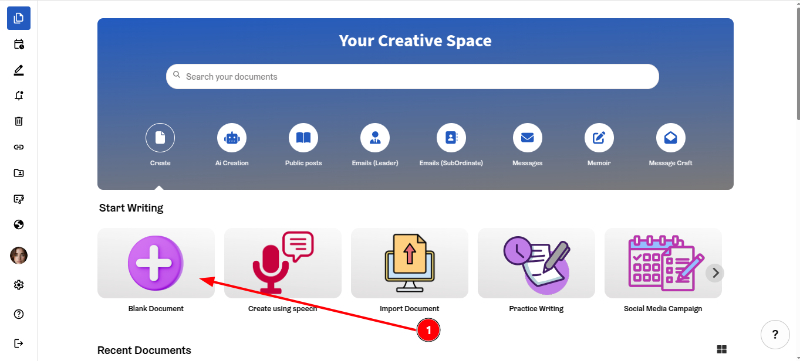
1. On the Dashboard, click 'Blank Document'.
2. Here is the blank document. You can now use ProofLex AI tools to generate your content.
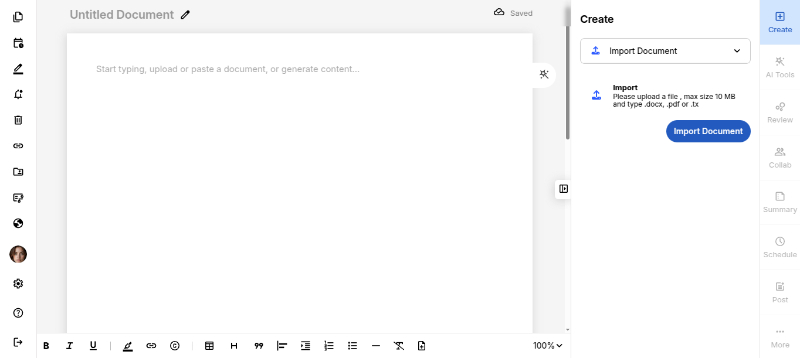
You can also start by importing your document in ProofLex.